Everything you need to run your studio.
From AI-powered setup to bookings, payments, and your own custom website— CourseSpot handles it all so you can focus on teaching.
See CourseSpot in action
A closer look at what makes managing your studio effortless.
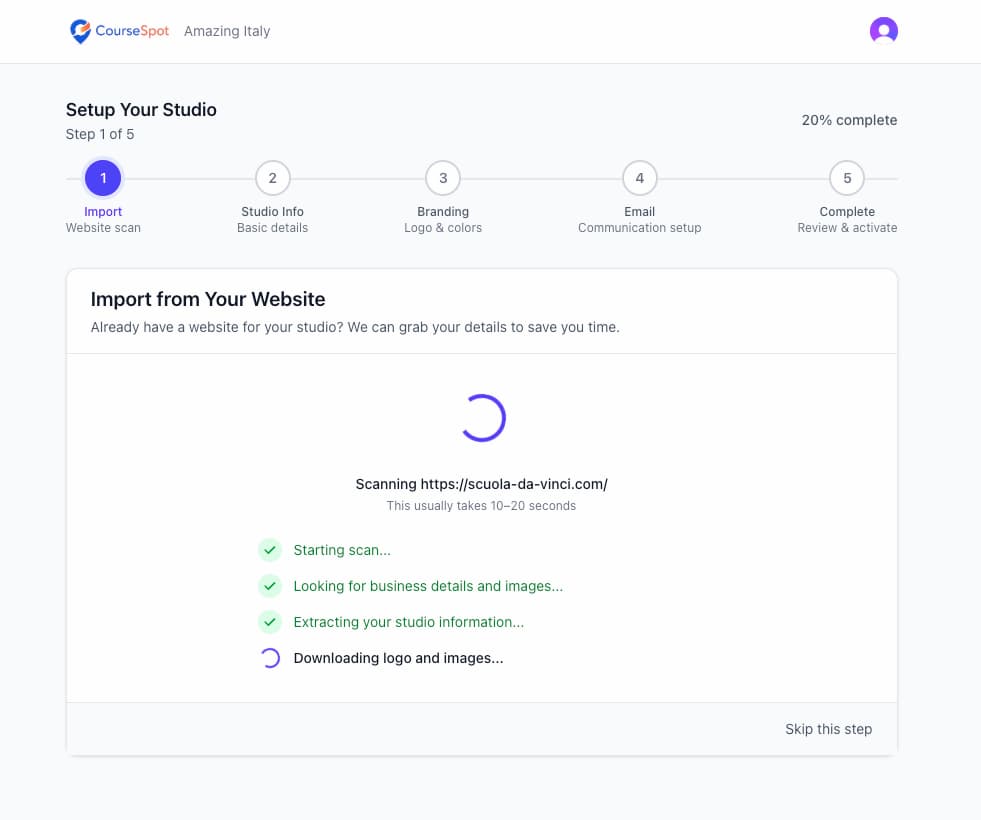
AI-Powered Setup from Your Existing Website
Paste your website URL and CourseSpot scans it automatically, extracting your logo, colours, contact details, and hero image. Your booking site arrives pre-configured.
- Auto-extract logo and brand colours
- Pull in your social links
- Hero image downloaded and ready
- Skip manual data entry entirely
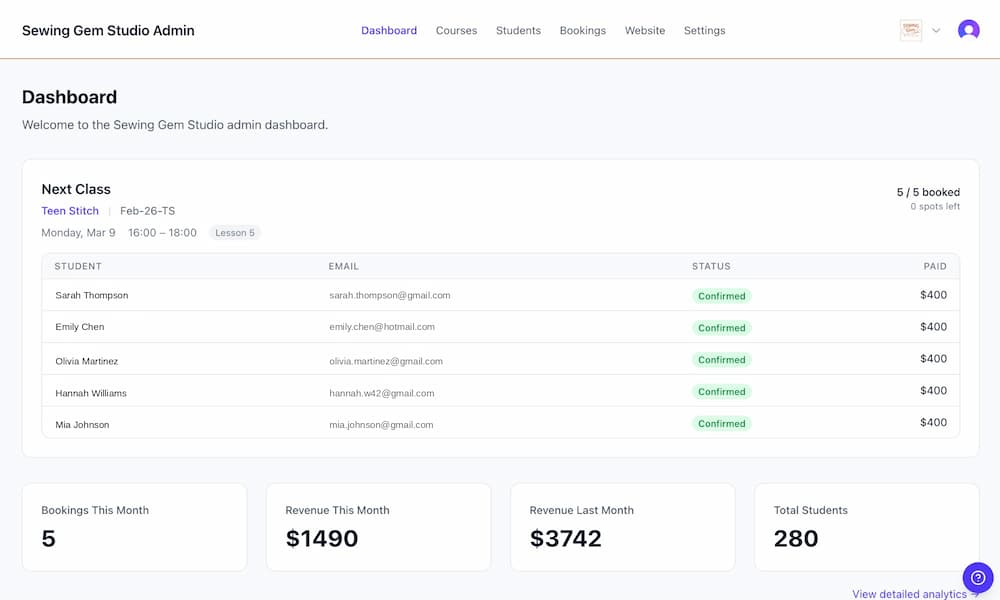
Complete Bookings Dashboard
A full view of every booking across all your courses. Filter, sort, export, and take action without digging through spreadsheets.
- Filter by student, course, class, or status
- Export any view to CSV
- Edit, cancel, or refund in one click
- See abandoned checkouts and follow up
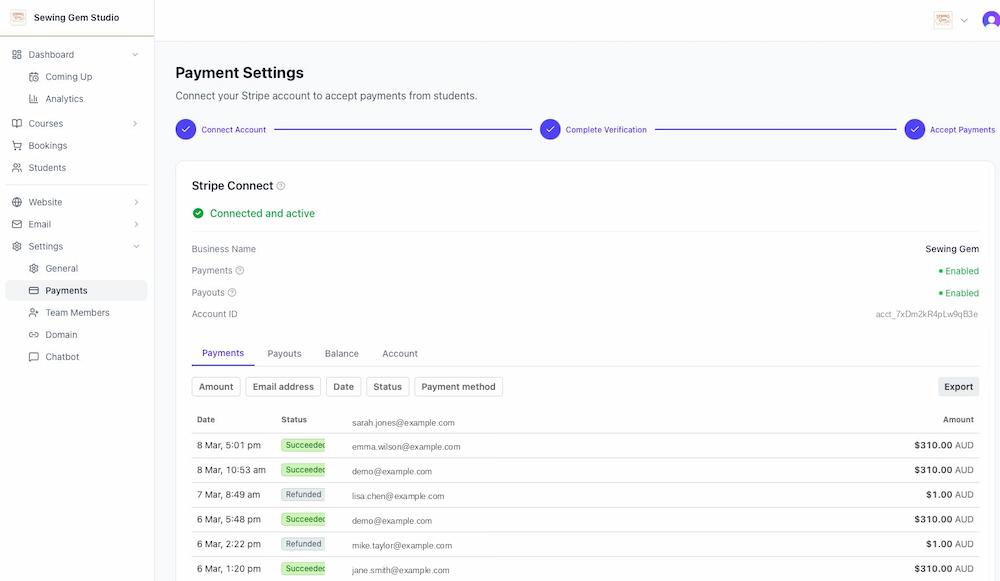
Your Money, Your Bank Account
CourseSpot uses Stripe Connect so every payment goes directly to your bank account, not ours. View payments, payouts, and balances from your embedded Stripe dashboard, and process full, partial, or custom refunds without leaving CourseSpot.
- Payments deposited directly to your bank account
- Embedded Stripe dashboard for payments, payouts, and balances
- Full, partial, or custom refund processing
- Transparent payout timing and transaction history
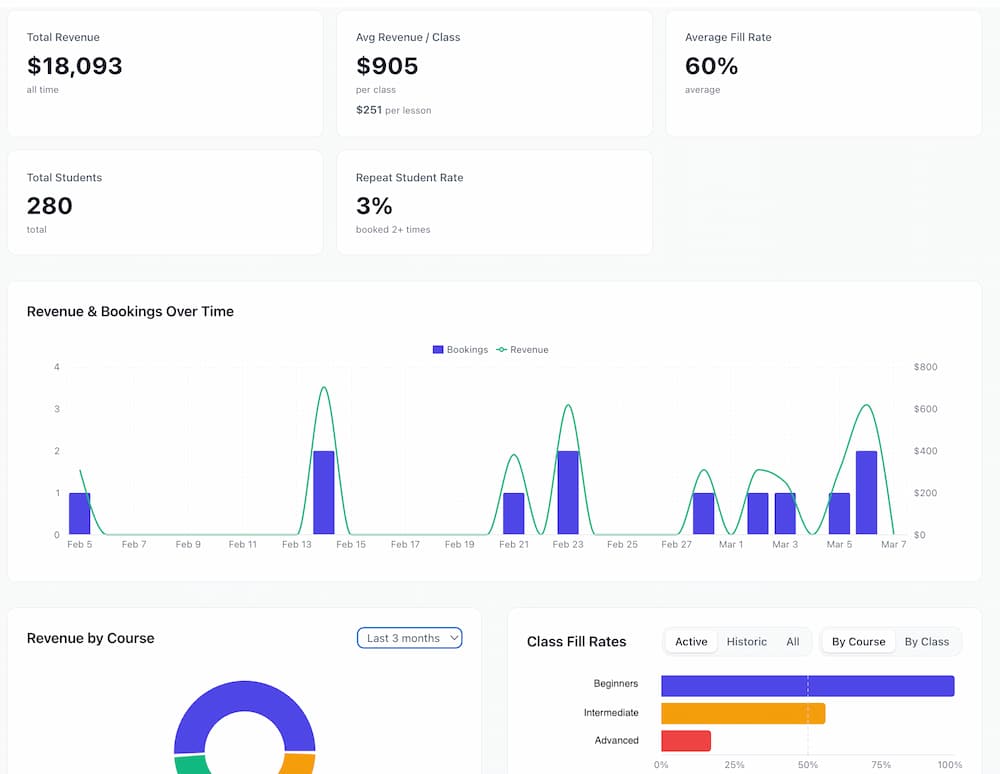
Analytics Dashboard
Track what's growing and what needs attention. Revenue, fill rates, and student acquisition in one clean view.
- Revenue trends over time
- Class fill percentage by course
- New vs. returning student breakdown
- All in one dashboard
Course Add-Ons
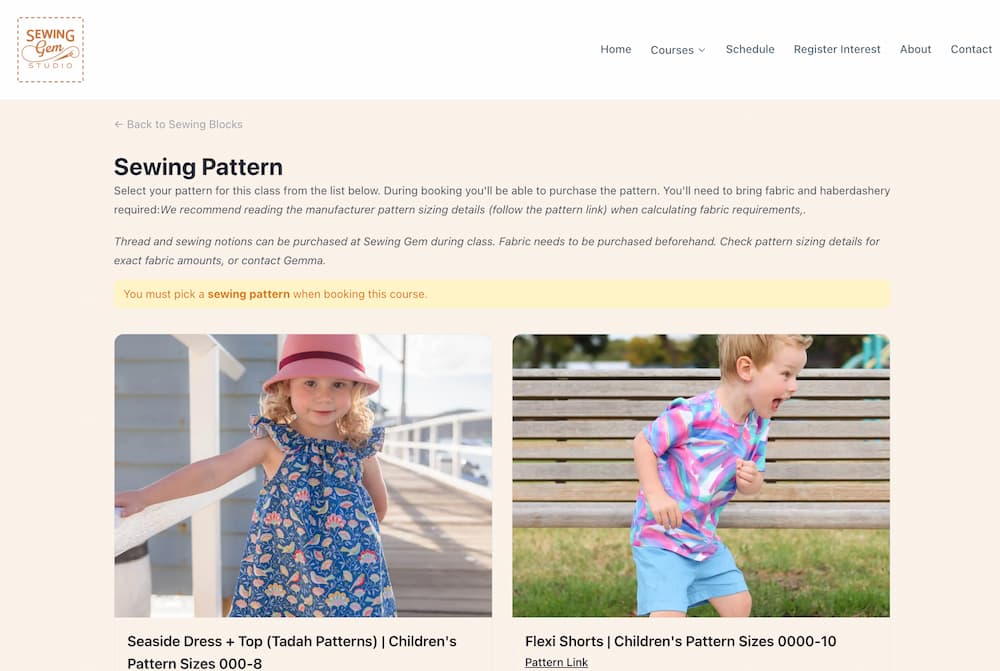
Upsell materials kits, equipment hire, or recordings directly on your course page. Students add extras at checkout without leaving the flow.
- Single-variant add-ons in a lightbox
- Multi-variant add-ons with full detail page
- No extra checkout steps
- Included in booking confirmation
AI Writing Assistant
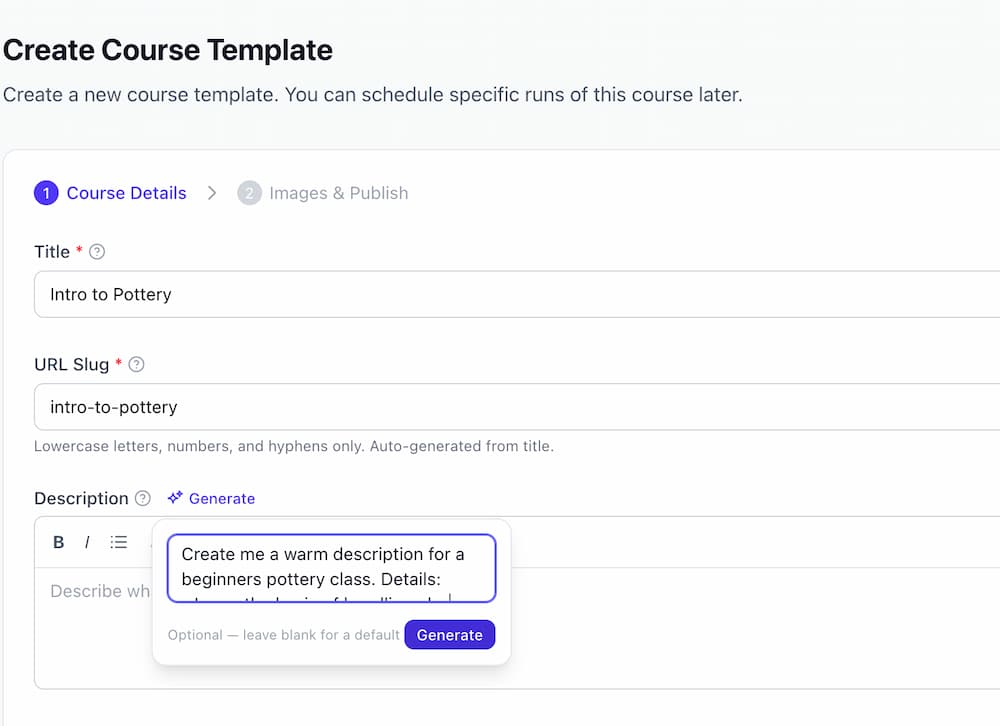
Every text field in your admin has an AI button. Write better course descriptions, bios, and materials lists in seconds, or let AI improve what you've already written.
- Drafts based on your business context
- Available on descriptions, bios, waivers, and FAQs
- Improve existing text with one click
- Saves time across every course
AI Chatbots for You and Your Students
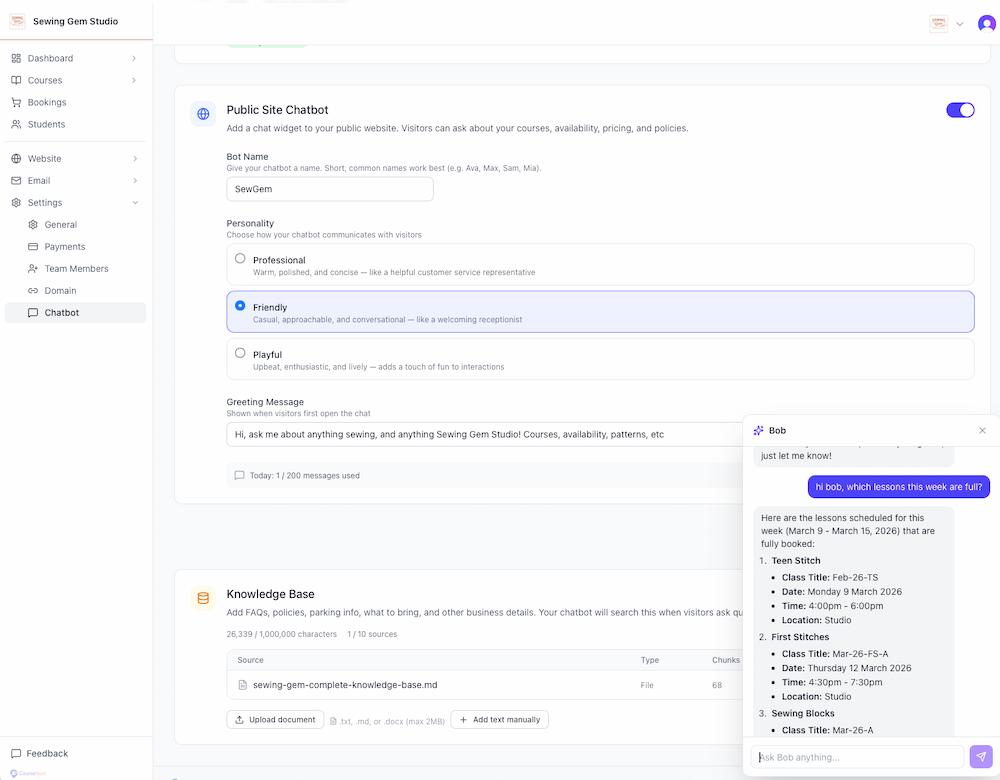
Your admin panel includes an AI assistant that can look up bookings, check class availability, and answer questions about your business. Your public booking website gets its own chatbot too, so students can ask about courses, schedules, and pricing without waiting for a reply.
- Admin AI assistant with access to your business data
- Public chatbot on your booking website for students
- Configurable personality and daily message budgets
- Answers questions about courses, schedules, and availability
Interactive Schedule Calendar
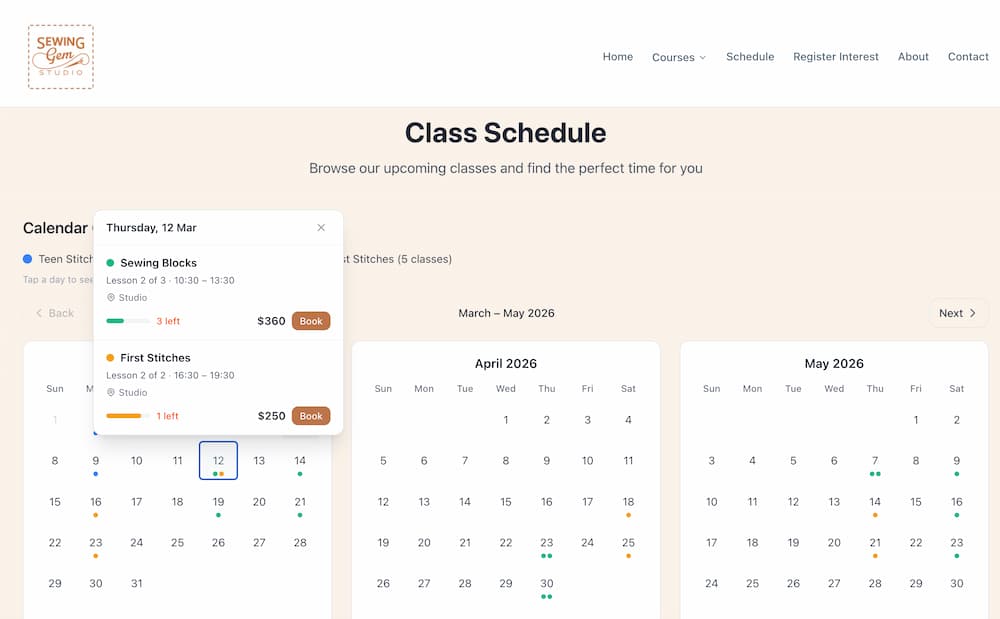
Students tap any day on your schedule page to see a pop-up with full class details, availability, and a Book button. No page navigation required.
- Tap to see class details and times
- Availability shown in real time
- Direct Book button in the pop-up
- Mobile-friendly
AI & Automation
AI-Powered Setup
Paste your existing website URL and CourseSpot auto-extracts your name, logo, colours, contact info, and hero image. Start pre-filled, not from scratch.
AI Writing Assistant
Every text field has an AI button. Generate course descriptions, materials lists, team bios, and disclaimers, or improve what you've already written.
AI Image Generation
No photographer needed. Describe the vibe and AI generates a professional course image instantly, ready to use on your course page.
AI Chatbots
An AI assistant in your admin panel that knows your business data, plus a public chatbot on your booking website so students can ask about courses and availability.
Bookings & Sales
Multi-Session Courses
Create single or multi-session courses with auto-generated lessons, recurring schedules, and capacity limits.
Bookings & Refunds
Filter by status, student, class, and date. Export to CSV, and process full, partial, or custom refunds.
Custom Booking Questions
Add per-course custom fields to your booking form, collecting dietary requirements, experience level, or anything you need.
Course Add-Ons
Sell optional extras (materials kits, equipment hire, recordings) directly on your course pages.
Your Booking Website
Custom Domain
Connect your own domain (e.g. book.yourstudio.com). Full DNS verification workflow included.
Interactive Schedule
Students tap a day to see a pop-up with course details, availability, and a direct Book button. No page navigation.
Hero Section Control
Add your logo overlay, choose dark or light overlay style, set aspect ratio, and control transparency.
Rich Text Content
Course descriptions, team bios, and materials lists support bold, italic, bullet points, and links.
Business Tools
Analytics Dashboard
Track revenue trends, booking rates, class fill percentages, and student acquisition, all in one view.
Abandoned Booking Recovery
See which students started checkout but didn't complete. Filter by time range and follow up.
Payments Dashboard
An embedded Stripe dashboard right inside CourseSpot. View payments, payouts, balances, and transaction history.
Digital Waivers
Collect signed liability waivers online during the booking process.
Admin & Team
Team Member Invites
Invite staff by email to help manage courses and classes. Remove access at any time.
Email Automation
11 automated email types: confirmations, reminders, cancellations, refunds, and more. Per-type toggles, custom sender name, and delivery tracking.
Student Communication
Send bulk emails to attendees of a specific class or your entire student list.
Secure & Compliant
SSL encryption, PCI compliance via Stripe, and automatic backups for peace of mind.
Perfect for creative and wellness studios
Whether you teach pottery, yoga, cooking, or any hands-on skill—CourseSpot adapts to your needs

Sewing Studios
Multi-week garment construction courses with pattern selection and materials tracking.
- • Garment sewing courses
- • Pattern-making workshops
- • Alterations classes

Pottery Studios
Wheel throwing and hand-building courses with materials tracking and firing schedules.
- • Wheel throwing classes
- • Hand-building workshops
- • Glazing sessions

Yoga Studios
Drop-in classes and workshop series with automatic reminders and recurring bookings.
- • Vinyasa flow classes
- • Meditation workshops
- • Yoga teacher training
And many more: cooking classes, dance studios, art workshops, music lessons, woodworking, and beyond.
Stop chasing bookings. Start today.
Free to set up. No monthly fees. No credit card required.
No website? You'll have one today.
Set up in 20 minutes. Cancel anytime.